



Why this app stands out
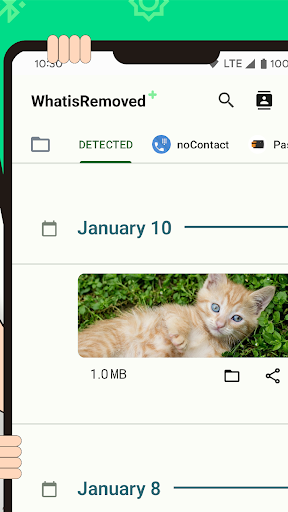
Ever accidentally deleted an important message or file and wished you could recover it? 😥 WhatisRemoved+ has your back! Picture never missing crucial updates from your favorite apps or losing essential files.
This app serves as your own digital protector, always keeping you in the loop. Boasting over 100,000 downloads and a 4.5-star rating, users praise its capability to recover deleted messages and track file changes. 📈 Give it a try and get your peace of mind back! ✅
Deleted Files
Scanner Safeguard your important documents and media! 📁 This feature scans selected folders and alerts you immediately if any files disappear. Perfect for busy professionals and students who can't afford to lose their work. It ensures your data stays protected and secure. 🛡️
Deleted Message
Viewer Ever felt that pang when you see 'This message was deleted'? 💔 Now you can discover what you missed! This feature provides a dedicated space to see all deleted messages from your chosen apps, keeping you fully informed. 🤔
Tracker
Never miss critical alerts! 🔔 This feature detects and logs changes or deletions in notifications from selected apps. Ideal for those who rely on timely updates for work or personal matters. Stay effortlessly informed. 👍


