



Why this app stands out
Imagine becoming proficient at your instrument effortlessly, turning practice from boring to joyful. 🎶 Violy makes that happen, offering a full suite for musicians of all levels. Whether you're a beginner fumbling with first notes or a pro refining skills, Violy is your personal coach, practice partner, and performance enhancer.
With over 50,000 users already enjoying benefits, it's time to elevate your musical journey. 🚀 Discover how Violy makes practice more effective and enjoyable, bringing you closer to musical mastery every session. ✨
Cloud
Browse a huge library of digital sheet music, covering classical masterpieces to modern pop, and you can also import your own scores. Ideal for learners who require particular songs for classes or musicians looking for varied repertoire. An invaluable resource for every player! 📚
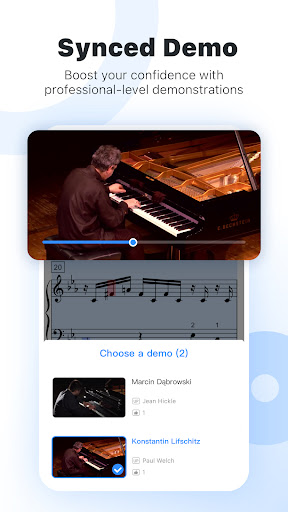
Synced Demo
View synchronized demonstration videos with sheet music that moves along with the sound. Perfect for visual learners and those who find it helpful to watch a performance. Master difficult passages by seeing and playing at the same time. 🧑🏫
Practice
Get instant feedback on your performance with 'Audition' mode, which identifies incorrect pitches and timing problems non-stop. Precision matters in music, and this feature guarantees you play each note correctly. Enhance your playing with swift, accurate evaluation. 🎯


