Editor's Review
Ever missed an important part of your favorite SCETV show because of a phone call or sudden interruption? 😩 Or maybe you're traveling and want to keep up with SCETV Radio's latest news or an engaging story? 📻 This app serves as your personal media companion, so you never miss anything.
With more than 10,000 on-demand shows and live radio channels, it brings the best of South Carolina's public media directly to you, no matter your location. 🏞️ Discover a variety of educational, cultural, and fun content tailored to your interests. Join the thousands of happy users who have made SCETV a part of their daily lives! ✨
Features
- Live Streaming Tune in to
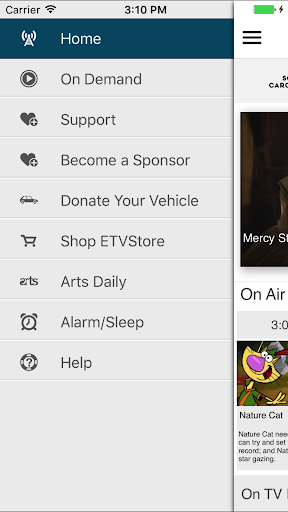
- SCETV Radio and TV live, with DVR-style pause and rewind, so you don't miss a single word! ⏸️ Perfect for travelers or those who need a short pause, this feature ensures you stay connected to your preferred live shows. 🚗 Listen in the background while multitasking! 🎧
- On Demand Keep current with all your favorite SCETV programs on your own time. 📺 View past episodes, particular clips, and even associated web content directly in the app. 🤔 Easily rewind and pause, guaranteeing a seamless watching or listening experience that matches your timetable. 🗓️
- Sleep Timer & Alarm Drift off to your preferred SCETV station and greet the day with it too! 😴 The integrated sleep timer and alarm offer a calming method to start and end your day, ensuring your beloved public media is always nearby. ☀️ Experience peaceful nights and refreshing mornings. 🌙
Pros
- The live streaming feature with pause and rewind capabilities transforms hectic schedules, allowing users to stay connected without missing anything. It's similar to having a personal DVR for live radio and TV. 🌟
- On-demand access to a vast library of SCETV shows, including segmented pieces and linked internet pages, provides a remarkably rich and immersive experience. It encourages more thorough investigation of topics. 📚
- The built-in sleep timer and alarm significantly boost the app's worth, making it a flexible bedside companion that delivers ease and practicality alongside top-notch content. ⏰