Editor's Review
Tired of the tedious process of sharing multiple photos one by one? 😩 Imagine effortlessly capturing those perfect moments from your gallery and placing them directly into your stories or messages! This app makes it happen, transforming a common annoyance into a smooth workflow.
With over 10,000 downloads and a 4.5-star rating, users adore the speed and simplicity. 🚀 Get ready to enhance your social media sharing and connect with friends more rapidly than before! ✨ Download now and experience the difference! 👍
Features
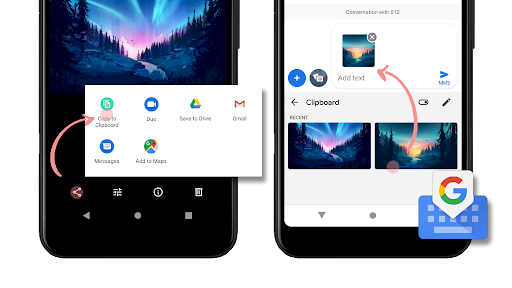
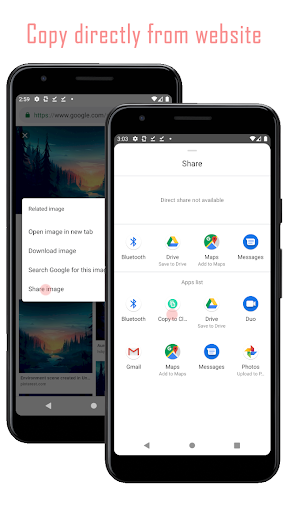
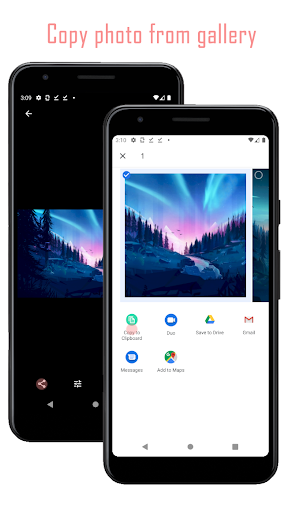
- Copy Photo Easily copy any photo from your gallery to your clipboard. Perfect for when you need to share an image without saving it multiple times or dealing with complex menus. Great for social media enthusiasts and busy communicators. 📸
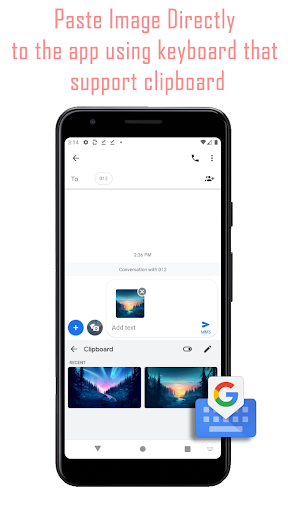
- Paste Image Utilize Gboard to paste your copied images into any app that supports image pasting. This bypasses the limitations of conventional sharing methods, enabling efficient multi-image story creation. A true breakthrough for content creators! ✍️
- Story Enhancer Overcome Android's single-photo limitation for stories. This app offers a workaround, letting you add multiple images to your stories seamlessly. Elevate your storytelling and impress your followers with vibrant content. 🌟
Pros
- The ability to copy and paste images directly to the clipboard is incredibly handy for quickly sharing content across various apps. It greatly streamlines the process, saving valuable time for users who frequently share visuals. This app cleverly bypasses Android's built-in restrictions on adding multiple photos to stories, providing a much-needed solution. The ease with which users can now create multi-image stories is a significant benefit. Integration with Gboard makes the pasting process exceptionally smooth. Users who already have Google Keyboard will find this feature intuitive and highly efficient, enhancing their overall mobile experience.