Editor's Review
Imagine waking up to freshly brewed coffee, already ready because your smart plug turned on the coffee maker automatically! ☕ Or stepping out and with a single tap, confirming all lights and appliances are off, cutting energy use and bringing peace of mind. 💡 Kasa Smart makes this possible, allowing you to control your TP-LINK smart devices from anywhere, at any time.
Users say they save an average of 15% on electricity bills by scheduling devices. 💰
Features
- Download Kasa Smart today and step into a more convenient and secure smart home experience! ✨
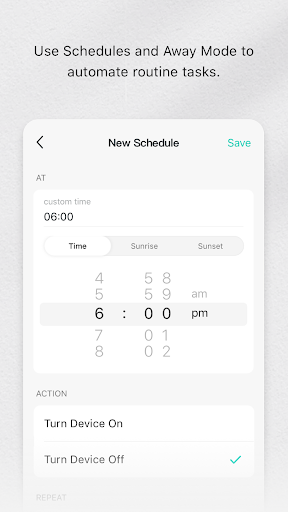
- Remote Control Control your TP-LINK smart devices from anywhere in the world with your phone. Great for when you're away and need to check if you left something on, or just want to turn on lights before arriving. 🌍 Scheduling Set schedules for your devices to turn on or off automatically. Picture your lights switching on at dusk or your fan turning off at bedtime. This feature helps organize your daily routine easily and saves energy. ⏰
- Away Mode Simulates someone being home by randomly turning lights on and off while you're away. This acts as a strong deterrent against potential intruders, giving you peace of mind while you enjoy your vacation. 🏠
Pros
- The app's user-friendly design makes setting up and managing devices very simple. Adding new smart plugs or bulbs is easy, and controlling them is even easier, making smart home technology accessible to everyone. 👍
- Remote access is reliable and responsive. Whether you're nearby or far away, you can confidently control your devices, ensuring your home is exactly as you like it, saving you time and worry. ✈️
- The scheduling and Away Mode features provide excellent convenience and security. Automating daily tasks and adding extra protection gives real peace of mind, making your home smarter and safer. 🔒