Editor's Review
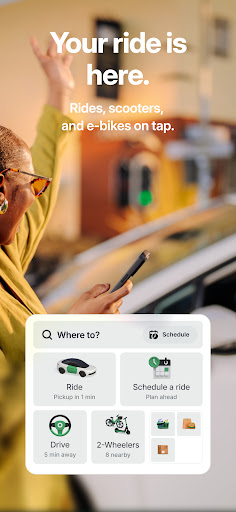
Imagine needing a sudden ride to the airport or a quick trip across the city without the trouble of flagging a taxi ✈️. Bolt turns those daily travel challenges into simple experiences, offering affordable and convenient rides right from your phone 📱. Available in over 600 cities worldwide, Bolt provides reliable service for commuters, travelers, and anyone needing efficient transportation 🌍.
With over 150 million rides completed, it shows its popularity and trustworthiness for safe and fast journeys. Download Bolt now and make your travel easier! ✅
Features
- Instant Rides Need a ride right away? Bolt connects you with highly-rated drivers for safe, affordable trips in seconds 🚀. Perfect for spur-of-the-moment outings or urgent travel, ensuring you get to your destination without delay. It helps busy individuals and last-minute travelers seeking convenience. Experience fast and reliable transportation like never before with this feature! ✨
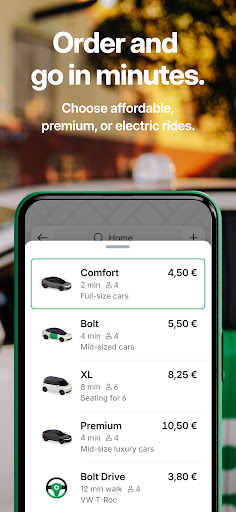
- Transparent Pricing See your fare before you book with Bolt's transparent pricing 💰. No more surprise charges, only clear costs for your journey. This feature helps budget-conscious travelers and those who appreciate financial transparency. Feel confident knowing exactly what you'll pay for each ride, making trip planning simple and accurate. 💯
- Scheduled Trips Plan your rides in advance, from 30 minutes up to
- 90 days ahead Ideal for airport pickups or early commutes, so you never miss a flight or appointment. This option is a lifesaver for organized planners and frequent travelers who need dependable transportation booked early. Reserve your ride effortlessly! 🌟
Pros
- Bolt's interface is extremely user-friendly, making booking rides simple for first-time users. The clean design and clear navigation ensure a seamless experience from start to finish, minimizing any confusion or frustration. It's genuinely an easy platform for all your travel needs. 👍
- The variety of ride options—from basic to luxury, electric, and even package delivery—caters to different needs. This flexibility means you can always choose a service that fits your specific requirements and budget, making Bolt a versatile transportation option. Great for everyday use and special occasions. 💯
- Safety features such as the emergency assistance button and audio trip recording provide great peace of mind. Knowing that your security is a priority with discreet yet effective tools allows for more confident travel, especially during late-night rides or unfamiliar places. Bolt takes rider safety seriously. ✅