




Why this app stands out
Dreaming of a new car but overwhelmed by the choices? 🚗 Picture yourself finding the perfect ride—a chic convertible for weekend getaways or a spacious SUV for family trips—all from the comfort of your couch! With over 6 million downloads and a massive inventory of 500,000 used cars nationwide, Goo-net makes that vision a reality.
✨ Access detailed condition reports and get free quotes quickly, turning your car search from a chore into a fun experience. 🗺️ Download Goo-net now and drive away with a smile! 🥳
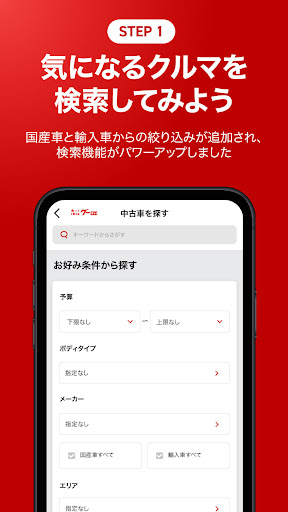
Extensive Search
Having trouble finding your dream car? Browse our vast selection of 500,000 used vehicles nationwide. Filter by make, model, body type, price, or even specific keywords to pinpoint exactly what you're after. Perfect for meticulous shoppers and anyone with a clear vision! 🎯
Detailed Condition
Check Worried about the condition of a pre-owned car? Our 'ID vehicles' undergo rigorous expert inspections, complete with clear inspection reports and high-resolution photos. Examine every detail closely to ensure a confident purchase. Peace of mind guaranteed! 👍
Free Estimates
& Inquiries Found a car you love? Request a free, non-binding quote and reach out to dealers directly from the app. Some dealerships even offer test drive booking, simplifying the buying process. Hit the road with confidence! 💨


