


Why this app stands out
Tired of missing concerts and shows because tickets sell out in seconds? 😩 Imagine easily grabbing that dream seat with just a few taps, bypassing those annoying website waits. This app makes that a reality, streamlining everything so you can focus on the excitement of the event, not the hassle of purchasing.
With over 20 million members on e+, you're part of a trusted community. ✨ Get your tickets faster and easier than before. 🎉 Ready to secure your next amazing experience?
Swift Booking
Tired of slow websites? This app offers a single-page checkout, giving app users priority for faster ticket purchases. Perfect for high-demand events, ensuring you don't miss out due to slow loading. ⚡️ Grab your tickets quicker and more easily than ever, all in one place. 🚀
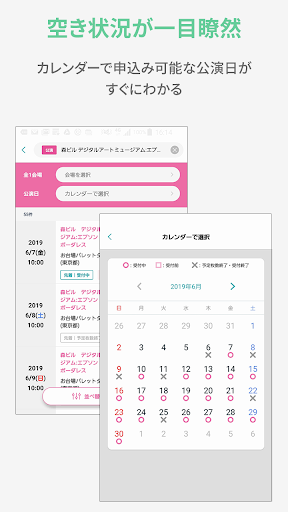
Vacancy Calendar
Never skip a chance to get a seat again! 🗓️ This feature lets you quickly see event availability at a glance using a calendar. Ideal for frequent concertgoers or anyone tracking multiple events. 📅 Check available dates clearly and book instantly. ✅
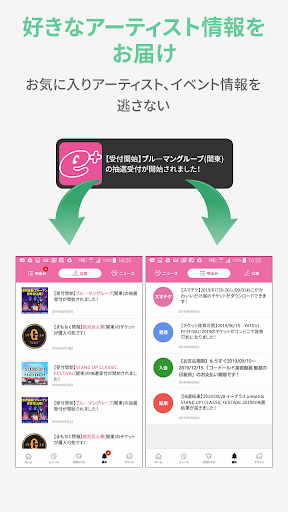
Personalized Hub
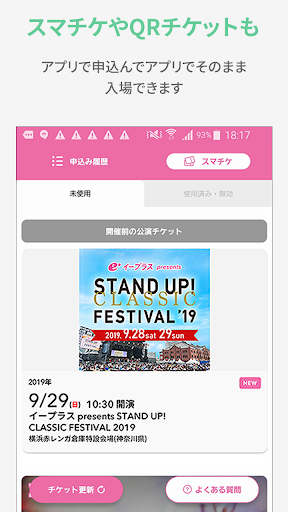
Your all-in-one center for everything events! 🌟 Get instant alerts for lottery results, view digital tickets, and receive fast links to your favorite artists' performances. Enjoy personalized recommendations based on your preferences. 💖 Stay informed and connected without fuss. 📲


